
Inbound and outbound links are the foundation of how search engines understand authority, relevance, and trust on the web.
At Odyssey Marketing, we use both inbound and outbound links strategically—not randomly—to strengthen SEO performance, improve content quality, and build long-term search visibility.
Inbound links build authority. Outbound links build context. Google rewards links that help users—not links added just for SEO.
Inbound and outbound links play a vital role in SEO because they help users navigate content easily and help search engines understand trust and relevance. From a user perspective, links guide readers to supporting information, related topics, and deeper insights.
Without links, content becomes isolated—and poor navigation leads to higher bounce rates. From a Google perspective, links act as context signals. Inbound links show that your content is trusted by others, while outbound links show that your content is well-researched and connected to authoritative sources.
Today, Google evaluates links based on:
For Example: A link using descriptive anchor text like “technical SEO audit checklist” gives Google a clear meaning.
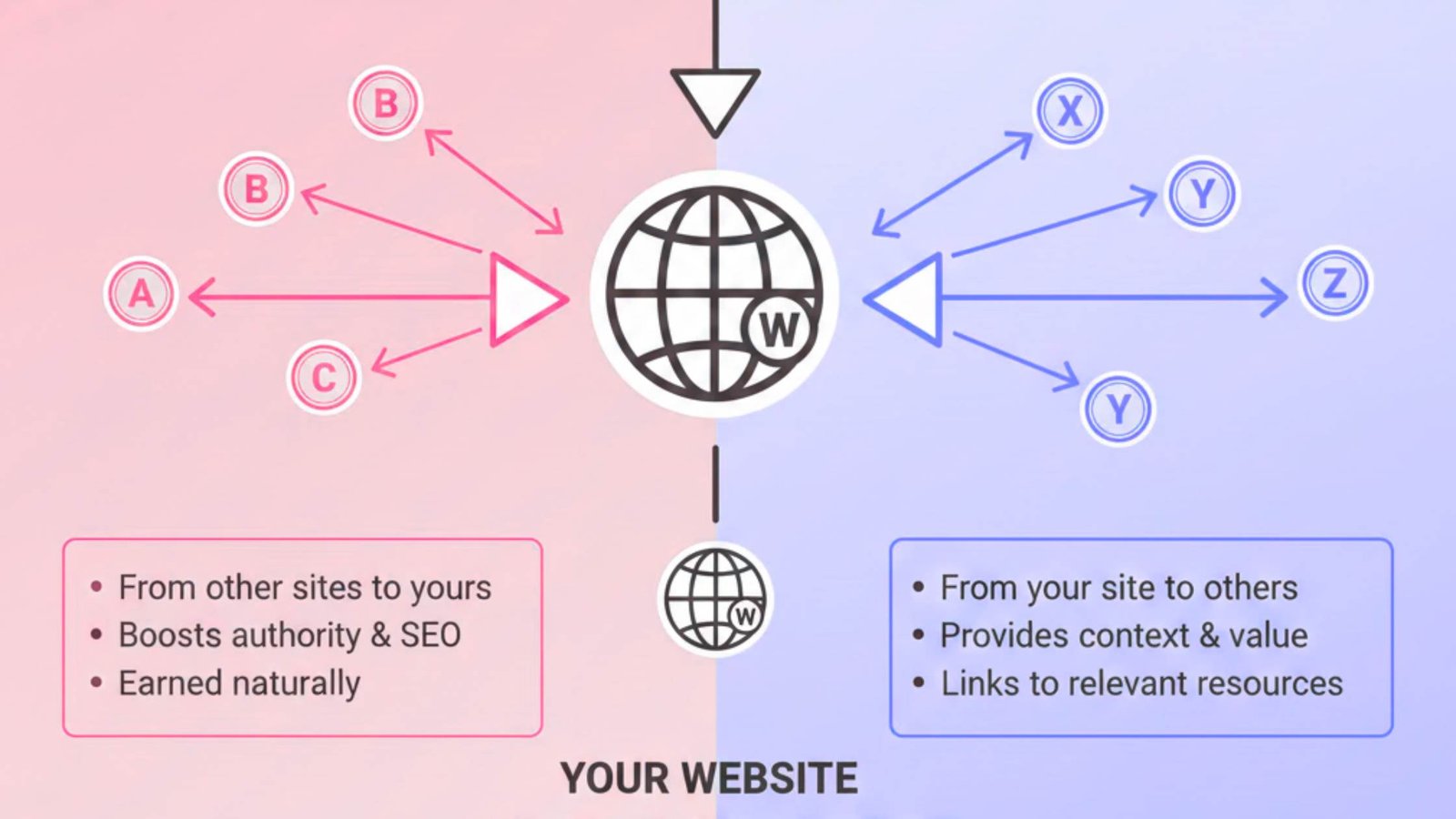
Inbound and outbound links differ mainly by direction, but their SEO impact depends on how they’re used, not just where they point.
Inbound links are links from other websites pointing to your site. They signal trust and authority to Google, especially when they come from relevant, high-quality sources. Think of inbound links as recommendations. The trustworthiness of the source directly impacts the link’s value.
Outbound links are links from your website pointing to other websites.
They help Google understand context, topic relevance, and content depth. Outbound links don’t “drain” authority. When used naturally, they improve credibility and user experience.
In the past, SEO focused heavily on PageRank flow. Today, Google evaluates links based on:
A single relevant inbound link from an authoritative site often outweighs dozens of low-quality links. Likewise, outbound links only add value when they genuinely help users understand the topic.
Factor | Inbound Links | Outbound Links |
Direction | Other sites → You | You → Other sites |
Main SEO Role | Build authority | Add context & trust |
Ranking Impact | High | Supportive |
Google Focus | Quality & relevance | Usefulness & intent |
Google doesn’t rank pages by counting links; it ranks them by understanding relevance and intent.
Google looks at anchor text and contextual signals to:
That’s why descriptive anchor text consistently outperforms generic phrases like “click here”—it provides clarity for both users and search engines.
At Odyssey Marketing, we treat links as UX signals, not SEO tricks; we treat them as navigation and trust signals. Every inbound and outbound link is placed intentionally to help users move naturally through content while reinforcing topical relevance.
Instead of chasing link volume, we apply intent-based linking, adding links only where they clarify meaning, strengthen authority, and enhance the reader’s journey. This mirrors how Google evaluates content today, focusing on relevance, context, and real user value, not outdated link-count formulas.
The result is content that aligns with Google’s Helpful Content System, performs strongly in AI Overviews, and delivers consistent, long-term visibility, not short-term SEO spikes.
Broken outbound links can be identified using SEO tools like Ahrefs, Semrush, Screaming Frog, or Google Search Console. These tools crawl your site and flag external links that return errors such as 404 or 500, allowing you to fix or replace them to maintain a good user experience.
The “Group similar links” filter combines backlinks that come from the same domain and point to the same page. This helps simplify reports, making it easier to analyse link patterns without reviewing every individual URL separately.
Yes, when used correctly. Outbound links to relevant, authoritative sources add context, support your content, and improve user trust. While they’re not a direct ranking booster like inbound links, they help Google understand topic relevance and content quality.
Linked domains refer to the unique websites that link to your site or that you link out to. Instead of counting total links, this metric focuses on domain-level connections, which gives a clearer picture of authority and trust across the web.